
Models and providers
NextClaw connects to hosted models, local models, and custom OpenAI-compatible endpoints. A model handles understanding and generation; the agent's files, browser, terminal, skills, and MCP connections determine how it can act.
A fresh installation is ready to use
A fresh installation enables OpenCode Zen Free Trial without requiring an API key. Chat selects big-pickle by default, and the model selector includes the other free-trial models currently available. NextClaw identifies itself as a coding-agent client and sends a stable session ID for each conversation, as required by OpenCode; no extra headers need to be configured manually.
Use this path to verify an installation and start the first task quickly. It runs through OpenCode Zen's public gateway, so limits and the model list may change. Request data may be used to improve models; do not send passwords, secrets, business-confidential material, or other sensitive content. Configure your own provider or a local model when you need stable quotas, a specific model, or a defined data contract.
Pick the easiest path to verify
- Keep the default OpenCode Zen free trial when you want to start without an API key.
- Configure a hosted provider when you already have an API key.
- Enter a compatible base URL, credential, and model name for a model gateway.
- Use Ollama or vLLM when the model should run locally.
- Select the appropriate runtime for agents backed by Codex, Claude Code, or another supported path.
The interface includes OpenCode Zen, OpenRouter, OpenAI, Anthropic, Gemini, DeepSeek, MiniMax, Moonshot, Qwen, Zhipu, AiHubMix, vLLM, and custom compatible providers. Actual model availability depends on the free-trial catalog, account, region, and service configuration.
Fetch the current model list in one click
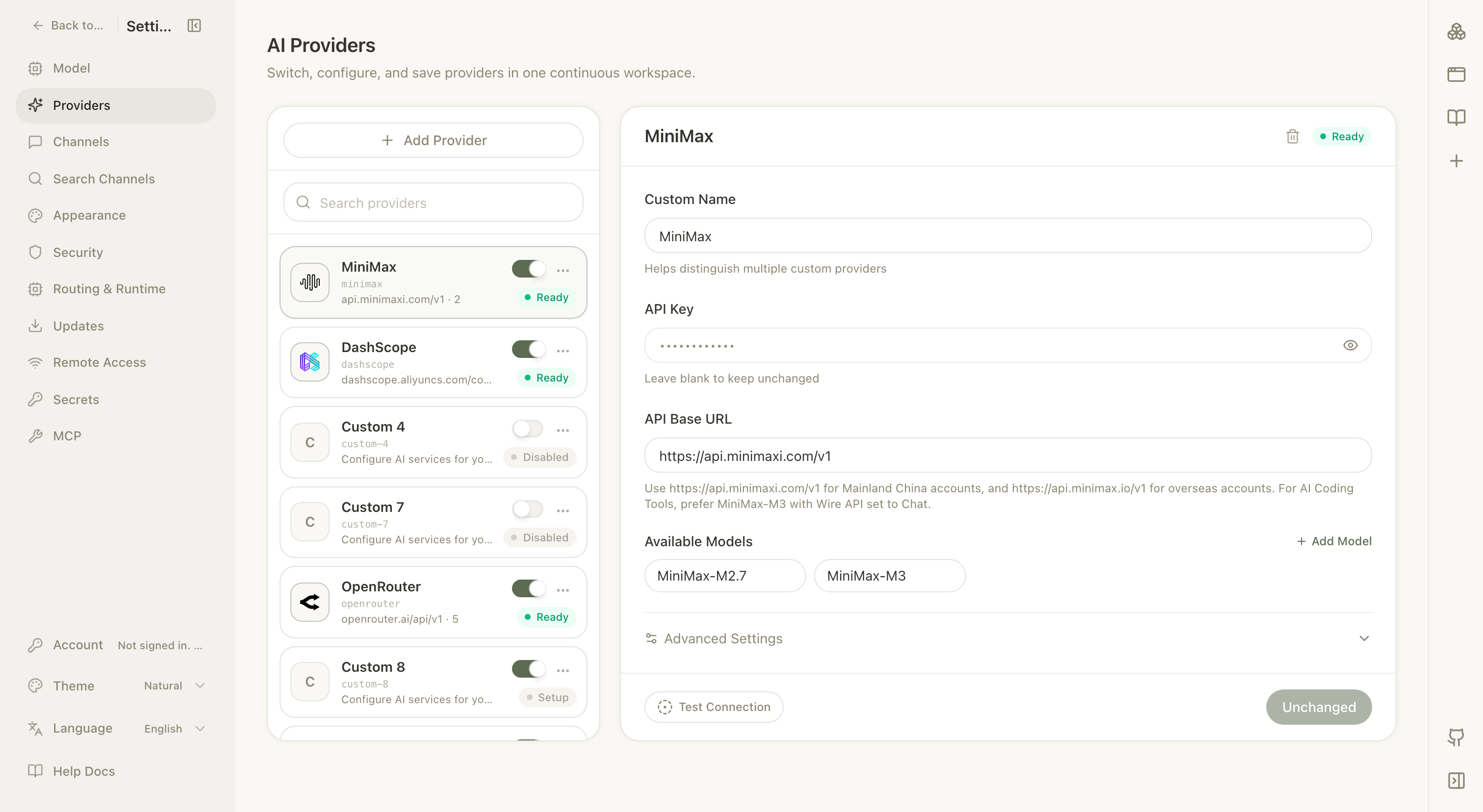
Open a provider with audited catalog support and select Fetch model list next to Available Models. NextClaw reads the provider's current catalog with the API base, API key, and extra headers currently shown in the form, but does not sync it into the draft automatically. The candidate panel expands and scrolls into view after a successful fetch, and its count includes only models that are not already in the draft. Select any subset and choose Add selected, or choose Add all. Existing models keep their order and duplicate IDs are excluded. If every upstream model is already present, the page says so instead of showing empty selection controls. Review the draft and select Save when ready; fetching alone does not change the saved configuration or remove models that are no longer listed upstream.
Opening a saved provider also reads the background catalog snapshot automatically. When unconfigured models are available, a prompt appears above the model list. Expand it, select the models you want, and choose Add selected, or choose Add all. These shortcuts only change the current form draft; select Save to apply them. Use Fetch model list when you need to fetch against unsaved API base, credential, or header changes instead.
To clean up configured models, choose Bulk delete below the model list. Select individual models or use Select all and Clear selection, then choose Delete selected. Deletion also changes only the current form draft and applies after you select Save.
Catalogs such as OpenRouter can contain hundreds of models. When more than 50 candidates are available, NextClaw removes Add all, adds catalog search, renders only the first 50 matches, and keeps Add selected. This makes a specific model easy to find without flooding the provider configuration.
Confirmed OpenAI-compatible providers and custom compatible endpoints use the standard model-list API, Anthropic uses its native model catalog, and OpenCode Zen Free Trial follows OpenCode's catalog metadata to exclude deprecated models and models with input charges. Fetching a catalog does not send test prompts or claim that every model passed a live inference check; account access, quotas, and service health still depend on the provider's response. If a custom endpoint does not implement model listing, the credential lacks permission, or the request fails, the UI shows the failure directly and manual model entry remains available.
Catalog suggestions are limited to chat models. NextClaw excludes specialized image generation, video generation, speech, embedding, reranking, moderation, and safety-classification models, then uses provider-supplied output modality metadata to keep text-output LLMs. Vision models that accept images but still return text remain eligible. When a compatible endpoint omits model-type metadata, NextClaw also applies conservative model type and ID filtering; a model omitted from suggestions can still be added manually.
Built-in providers use an explicit capability allowlist: Fetch model list and background refresh are enabled only after the catalog URL, protocol, and authentication contract have been audited. The current allowlist is NextClaw, OpenAI, Anthropic, OpenRouter, DeepSeek, MiniMax API, AiHubMix, Groq, OpenCode Zen, and vLLM. Gemini, regular DashScope, DashScope Coding Plan, Kimi, Kimi Coding, Zhipu AI, Xiaomi MiMo, MiniMax Portal, and Qwen Portal currently retain manual model entry only. This does not affect normal calls to configured models; discovery can be enabled later after its exact contract is verified.
Choose a model in chat
Open the model selector in the chat input. Favorites and recently used models appear first; remaining models are grouped by provider. Provider groups show model names, while favorites and recent entries retain the provider name to distinguish models with matching names.
When you start a new conversation, NextClaw prefers the model and corresponding thinking level from the most recent conversation using the same agent runtime. It restores them as one preference. If that model is no longer available, NextClaw selects an available model and uses that model's own default thinking level instead of carrying over a level from another model.
Discover newly available models automatically
After NextClaw starts, it reads the catalogs of enabled providers and refreshes them every 12 hours. Automatic refresh only updates an in-memory snapshot of upstream facts. It never adds, removes, reorders, or switches configured models on its own.
The collapsed model selector stays quiet. When an upstream catalog contains models that are not configured yet, expand the selector to see N new models available near the bottom of the panel. Select View, browse All or a specific provider group, then select Add for a model. Adding updates the provider without switching the current conversation, and the panel stays open for more additions. The row is absent when there is nothing new.
The first snapshot of a catalog with hundreds of candidates becomes a seen baseline instead of hundreds of “new model” reminders. Later prompts contain only IDs added after that baseline. Select Don't remind me about these for a small batch you do not want to add. This only updates the reminder state in the current browser; it does not add models or change provider configuration, and the full catalog remains searchable on the provider page.
For a quick fresh-environment check, install and start NextClaw, wait a few seconds, then expand the model selector in chat. The default OpenCode Zen path needs no API key. If its public catalog includes free models beyond the configured defaults, the discovery row appears in the panel. Open Settings → Providers → OpenCode Zen Free Trial to see the same additions automatically; add a selection or add all and confirm that Save becomes available.
Verify more than a greeting
Run a short task that reads material and creates a file. Confirm authentication, streaming, tool calls, file previews, and visible errors all work.
Use multiple models only when cost, speed, privacy, or task type truly differs. A stable default agent plus a few dedicated agents is usually clearer than switching models before every message.
Content sent to a hosted model follows that provider's data policy. Local inference reduces model-data egress, but MCP, channels, and web tools can still send data elsewhere.
See Choose a provider path for setup details.